Smiling casual mature businesswoman using smartphone at the window in loft office
Frequently Asked Questions

Accounts.

We offer a wide range of bank accounts for your personal banking needs.

All Accounts FAQs.

The easiest way to reset the PIN on your card is from within Internet Banking or the App. In Internet Banking, you can navigate to Services > Card Management and in the App, you can simply select from the main menu Settings > Cards.

Once on the Card Management screen, you can select the card for which you would like to change the PIN, and enter a new one.

If you do not have access to Internet Banking or the App, you can change your card PIN by heading into a branch and requesting assistance from one of our friendly staff members, who can also set you up with our digital facilities so you can change your card PIN digitally thereafter.

Did you find this answer helpful?

We’re glad you’re happy. Feel free to share more!

Sorry to hear that! Please share how we can improve.

Unexpected error, please try again later.
Thank you for your feedback!

The following transaction types will not round2save:

  • BPAY® Payments
  • Fee transactions
  • Transfers between accounts
  • Osko Payments.

Did you find this answer helpful?

We’re glad you’re happy. Feel free to share more!

Sorry to hear that! Please share how we can improve.

Unexpected error, please try again later.
Thank you for your feedback!

round2save can be activated in our Mobile Banking App, but not via Internet Banking.

Did you find this answer helpful?

We’re glad you’re happy. Feel free to share more!

Sorry to hear that! Please share how we can improve.

Unexpected error, please try again later.
Thank you for your feedback!

Currently no. However, this feature may be introduced in the future if enough interest is generated.

Did you find this answer helpful?

We’re glad you’re happy. Feel free to share more!

Sorry to hear that! Please share how we can improve.

Unexpected error, please try again later.
Thank you for your feedback!

An opening deposit will be required at the time a new account is opened via the Mobile App. However, this can be a small deposit as little as $1.

Did you find this answer helpful?

We’re glad you’re happy. Feel free to share more!

Sorry to hear that! Please share how we can improve.

Unexpected error, please try again later.
Thank you for your feedback!

Yes, existing members can open a variety of transaction and savings accounts via the Open Account menu in the Mobile App.

Did you find this answer helpful?

We’re glad you’re happy. Feel free to share more!

Sorry to hear that! Please share how we can improve.

Unexpected error, please try again later.
Thank you for your feedback!

Yes, you can start an application and save and resume at a later time if necessary. Once you save the application you will be sent a confirmation email and a loan application reference number. You will need this information to resume the application.

Did you find this answer helpful?

We’re glad you’re happy. Feel free to share more!

Sorry to hear that! Please share how we can improve.

Unexpected error, please try again later.
Thank you for your feedback!

A pending transaction can only be cancelled if the merchant provides us with a pre-authorisation release confirming they have no intention to debit the restricted funds. As the merchant has authorisation over the funds, we cannot release the funds without their authority.

If you believe a pending transaction is unauthorised, once the funds have debited from your account, we can help you dispute the transaction. Please send us a secure message via Internet Banking or the Mobile App with details of the transaction. Alternatively, you can call us on 13 25 85 or visit your nearest branch.

Did you find this answer helpful?

We’re glad you’re happy. Feel free to share more!

Sorry to hear that! Please share how we can improve.

Unexpected error, please try again later.
Thank you for your feedback!

No, round2save will not work on accounts with more than one signatory.

Did you find this answer helpful?

We’re glad you’re happy. Feel free to share more!

Sorry to hear that! Please share how we can improve.

Unexpected error, please try again later.
Thank you for your feedback!

Any cash withdrawals via ATM (including international ATM cash withdrawals) are included in round2save rounding up, should the final transaction value not be a round figure.

For example, if you were to withdraw money from an ATM overseas, due to the exchange rate it is likely that the transaction amount would not be a round figure, in which case the round2save amount would be transferred to your nominated savings account.

Did you find this answer helpful?

We’re glad you’re happy. Feel free to share more!

Sorry to hear that! Please share how we can improve.

Unexpected error, please try again later.
Thank you for your feedback!

Beyond Bank has no planned closures of any branches across its national network.

If you are in an area that currently does not have a Beyond Bank branch you can access cash using your card at stores that allow cashout, using an ATM or using Bank@Post^.

In the event that opening hours are adjusted, we will let you know. Rest assured you can always access your money and make payments via Internet Banking or the Mobile App or via phone on 13 25 85.

*Please note: ATM owners may charge a direct ATM fee that will be advised at the time of the transaction. Fees and charges may apply for certain transactions, for details see our disclosure documents.

Did you find this answer helpful?

We’re glad you’re happy. Feel free to share more!

Sorry to hear that! Please share how we can improve.

Unexpected error, please try again later.
Thank you for your feedback!

Once logged into the Mobile App, your daily transfer limits can be increased or decreased via Settings > Transaction Limits. If you wish to increase any of your daily transfer limits above $20,000 you will need to call us on 13 25 85 or visit your nearest branch.

Did you find this answer helpful?

We’re glad you’re happy. Feel free to share more!

Sorry to hear that! Please share how we can improve.

Unexpected error, please try again later.
Thank you for your feedback!

Once logged into Internet Banking, your daily transfer limits can be increased or decreased via Settings > Transaction Limits. If you wish to increase any of your daily transfer limits above $20,000 you will need to call us on 13 25 85 or visit your nearest branch.

Did you find this answer helpful?

We’re glad you’re happy. Feel free to share more!

Sorry to hear that! Please share how we can improve.

Unexpected error, please try again later.
Thank you for your feedback!

If you are wishing to dispute a transaction you do not recognise, please contact us on 13 25 85, visit your nearest branch, or send a Secure Message via Internet Banking or the Mobile App.

You will be required to provide us with the following details: date of the transaction, the amount of transaction, and the merchant name. We recommend keeping any EFTPOS or email receipts, as transactions will sometimes show the name of the parent organization rather than the trading name.

We may be required to cancel your card to prevent further financial loss.

Did you find this answer helpful?

We’re glad you’re happy. Feel free to share more!

Sorry to hear that! Please share how we can improve.

Unexpected error, please try again later.
Thank you for your feedback!

Existing members can open a Community Reward Account through Internet Banking or the Mobile App. New members can open an account online, by visiting your nearest branch or by calling us on 13 25 85 for more information. New members will need either a Drivers Licence or an Australian Passport, or a Birth Certificate and either a Medicare Card or Student Photo ID (if full-time student) to open a new account.

Did you find this answer helpful?

We’re glad you’re happy. Feel free to share more!

Sorry to hear that! Please share how we can improve.

Unexpected error, please try again later.
Thank you for your feedback!
  • Existing members can open a Purple Transactor Account through Internet Banking or the Mobile App.
  • New memberships can be opened online, by visiting your nearest branch or by calling us on 13 25 85 for more information.
    • New members will need either a Drivers Licence, an Australian Passport or both a Medicare Card and an Australian Birth Certificate to open a new account online. For alternative identification options, please visit us in a branch.

Please note that you will not be able to make transfers to cryptocurrency platforms during the first 90 days after opening a new purple transactor account.

Did you find this answer helpful?

We’re glad you’re happy. Feel free to share more!

Sorry to hear that! Please share how we can improve.

Unexpected error, please try again later.
Thank you for your feedback!

Existing members can open a Retirement Account account through Internet Banking or the Mobile App. New memberships can be opened online, by visiting your nearest branch or by calling us on 13 25 85 for more information. New members will need either a Drivers Licence or an Australian Passport, or a Birth Certificate and either a Medicare Card or Student Photo ID (if full time student) to open a new account.

Did you find this answer helpful?

We’re glad you’re happy. Feel free to share more!

Sorry to hear that! Please share how we can improve.

Unexpected error, please try again later.
Thank you for your feedback!

Existing members can open a Term Deposit account through Internet Banking or the Mobile App. New memberships can be opened online, by visiting your nearest branch or by calling us on 13 25 85 for more information. New members will need either a Drivers Licence or an Australian Passport, or a Birth Certificate and either a Medicare Card or Student Photo ID (if full time student) to open a new account.

Did you find this answer helpful?

We’re glad you’re happy. Feel free to share more!

Sorry to hear that! Please share how we can improve.

Unexpected error, please try again later.
Thank you for your feedback!

You can set up recurring scheduled transfers between your own accounts using Internet Banking or the Mobile App.

Internet Banking:

  • Once logged in, select Transfer/Pay > Transfer
  • Choose the accounts you wish to transfer from and to
  • Enter the transfer amount and any reference
  • Select Schedule Payments (located under the transfer amount)
  • Enter the information based on your desired transfer frequency.

Mobile App:

  • Once logged in, select Pay > Transfer
  • Choose the accounts you wish to transfer from and to
  • Enter the transfer amount
  • Set your schedule by clicking the 'Schedule this payment?' button below the amount
  • Enter the information based on your desired transfer frequency.

You can also set up recurring scheduled transfers to accounts outside of Beyond Bank using Internet Banking or the Mobile App.

Internet Banking:

  • Once logged in, select Transfer/Pay > Make Payment
  • Select the Schedule button
  • Enter account details using New Payee or select from your list of Saved Payees
  • Once the payee information is entered, choose the amount and desired transfer frequency.

Mobile App:

  • Once logged in, select Pay > Make Payment
  • Enter account details using New Payee or select from your list of Saved Payees
  • Enter the transfer amount
  • Set your schedule by clicking the 'Schedule this payment?' button below the amount
  • Enter the information based on your desired transfer frequency.

Please note that recurring payments to other banks is currently only available with BSB and Account Number, payments using PayID are unfortunately not able to be scheduled at the present time.

Did you find this answer helpful?

We’re glad you’re happy. Feel free to share more!

Sorry to hear that! Please share how we can improve.

Unexpected error, please try again later.
Thank you for your feedback!

To change the name on your account you must provide us with an original or certified copy of your change of name documentation, along with identification showing your current name.

You will need to visit your nearest branch with the documentation to request the change of name. If you do not live near one of our branches, please call us on 13 25 85 for further assistance.

Did you find this answer helpful?

We’re glad you’re happy. Feel free to share more!

Sorry to hear that! Please share how we can improve.

Unexpected error, please try again later.
Thank you for your feedback!

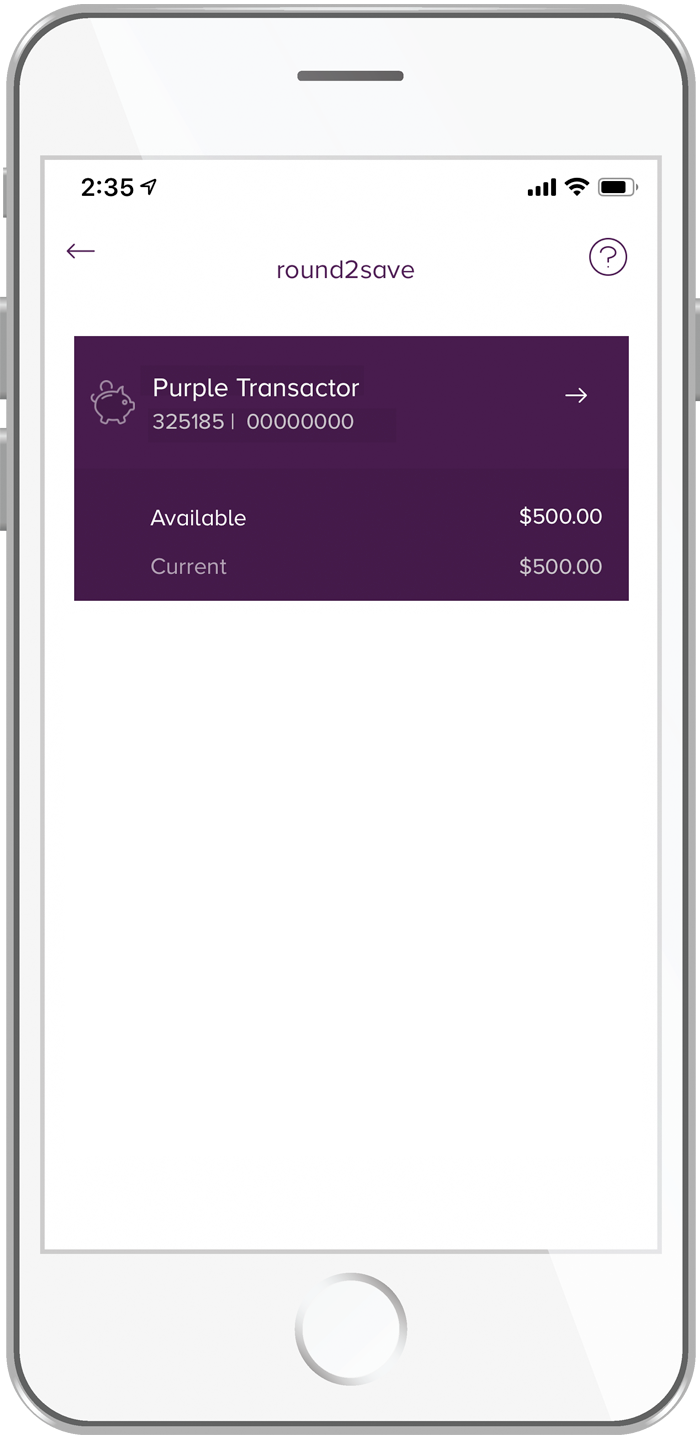
To enable round to save follow these steps:

1. Log in in the Mobile App.

2. Go to Accounts and select a transaction account that you would like to enable round2save on.

round2save step 1

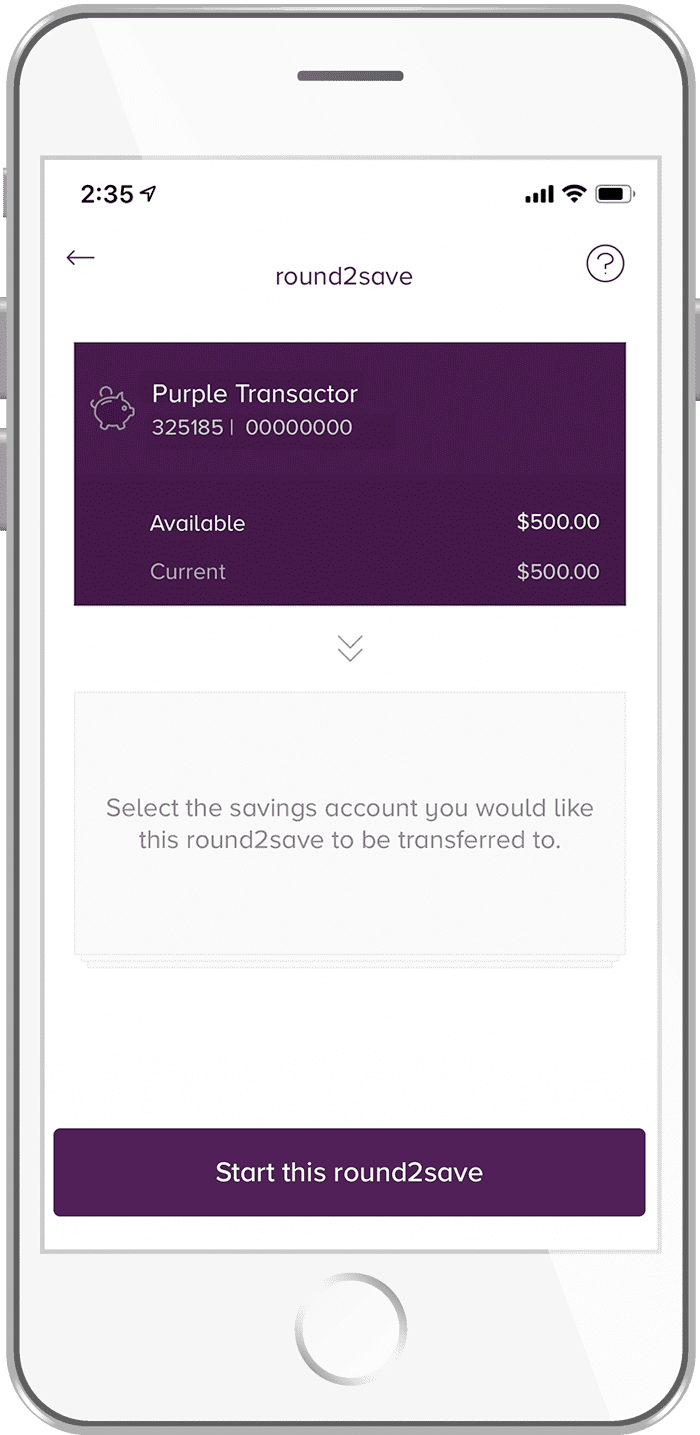
3. Select a savings account that you would like to deposit your round2save earnings in.

round2save step 2

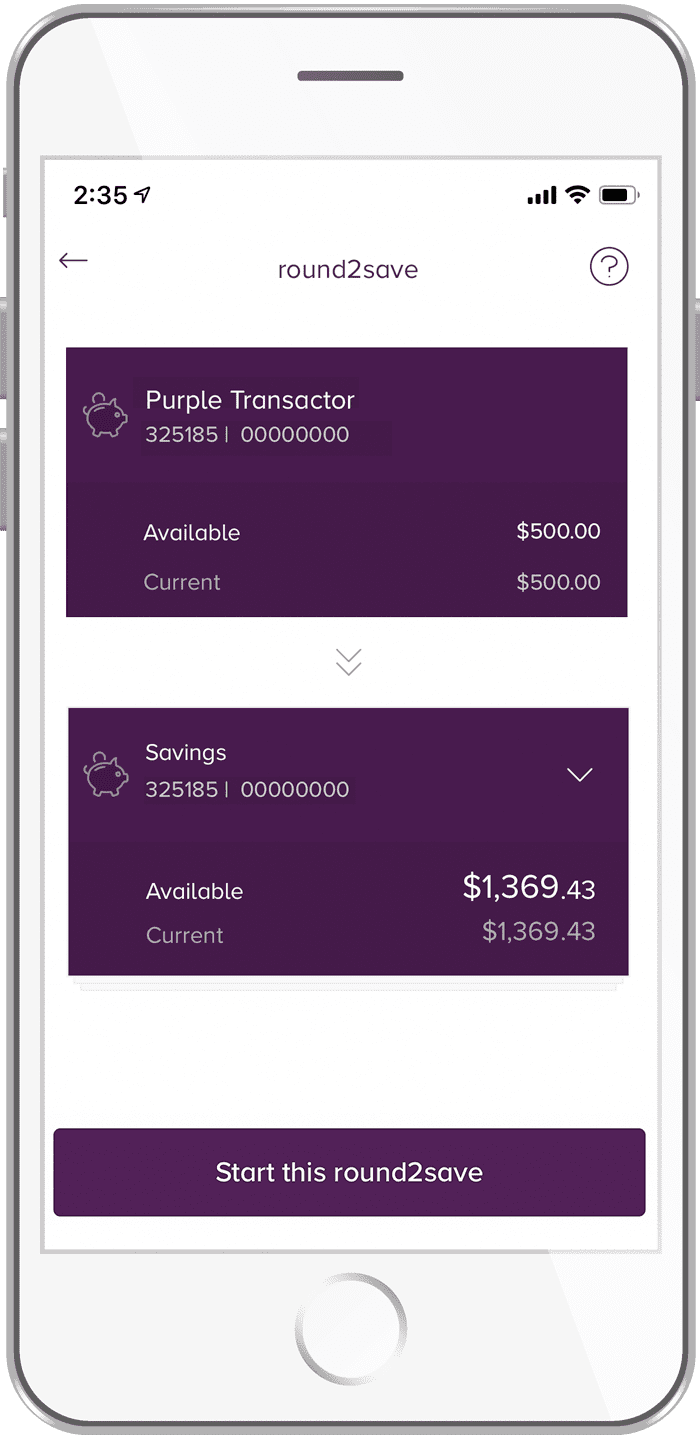
4. Start transacting using your VISA Debit card and watch your savings grow!

round2save step 3

Did you find this answer helpful?

We’re glad you’re happy. Feel free to share more!

Sorry to hear that! Please share how we can improve.

Unexpected error, please try again later.
Thank you for your feedback!

Viewing your interest details is simple and secure in Internet Banking and the Mobile App:

  • Log in to Internet Banking
  • Go to Accounts, then Interest Details
  • Interest Details are displayed.

Or

  • Log in to your Mobile App
  • Go to Accounts, then locate your desired account
  • Click Available/Current, then select Info
  • Interest Details are displayed.

Did you find this answer helpful?

We’re glad you’re happy. Feel free to share more!

Sorry to hear that! Please share how we can improve.

Unexpected error, please try again later.
Thank you for your feedback!

You can find your member number either on the front of your Beyond Bank Card or at the top of the first page of your statements.

If you use our Mobile Banking app, you can also find this in the menu when logged in under Useful Info > App Details.

If you do not have access to these options, our team can provide you with your member number in a branch or by phone on 13 25 85.

Did you find this answer helpful?

We’re glad you’re happy. Feel free to share more!

Sorry to hear that! Please share how we can improve.

Unexpected error, please try again later.
Thank you for your feedback!

You can view your account balance at any time by logging into Internet Banking or the Mobile App and selecting the Accounts menu option.

Alternatively, you can call our Account Information Line or Member Service Centre on 13 25 85 with your Telephone Banking Passcode.

Did you find this answer helpful?

We’re glad you’re happy. Feel free to share more!

Sorry to hear that! Please share how we can improve.

Unexpected error, please try again later.
Thank you for your feedback!

Cash deposits can be made into your account at your nearest branch or by using the Bank@Post service at participating Australia Post locations (fees may apply, view our Fees & Charges guide for details).

Cheque deposits can be made in a branch, by posting them to us at GPO BOX 1430, Adelaide SA 5001, or for cheques issued to you in your name, these can also be deposited using the Bank@Post service (Bank@Post is unfortunately not able to be used for cheques in joint names or in the name of a business account). Please note that cheque deposits in a branch can take up to 5 business days to clear into your account, for cheque deposits via Australia Post this can be up to 8 business days. The time frame if a cheque is mailed to us may be longer depending on when the cheque is received in the mail.

Alternatively, online transfers to your account can be made from other financial institutions using your registered PayID for instant* access or with your BSB and account number for access within 1-2 business days.

If you have coins to deposit these can be taken into a branch bagged in denomination lots and can be deposited for you. Alternatively, some of our branches have coin counting machines that can automatically count the coins for you for deposit. To check if your nearest branch has a coin counter please contact them via the contact details here.

* Faster transfers are available between participating banks. A full list of participating banks is available here.

Did you find this answer helpful?

We’re glad you’re happy. Feel free to share more!

Sorry to hear that! Please share how we can improve.

Unexpected error, please try again later.
Thank you for your feedback!

Cash withdrawals can be made from your account at your nearest branch. Alternatively, online transfers from your account can be made via the transfer menu option in Internet Banking or the Mobile App.

Did you find this answer helpful?

We’re glad you’re happy. Feel free to share more!

Sorry to hear that! Please share how we can improve.

Unexpected error, please try again later.
Thank you for your feedback!

You may cancel a direct debit at any time by notifying us on 13 25 85 or visiting one of our branches. We would encourage you to notify the debiting institution of your request to cancel the direct debit.

The cancellation of direct debit received on the same day a direct debit is scheduled will not take effect until the next business day.

Once notified of the cancellation, we can stop any further payments from being made.

Did you find this answer helpful?

We’re glad you’re happy. Feel free to share more!

Sorry to hear that! Please share how we can improve.

Unexpected error, please try again later.
Thank you for your feedback!

Pending transactions will be deducted from your ‘available balance’ immediately, however, the amount will not be deducted from your ‘account balance’ until the transaction process is complete (which can take up to five business days).

Did you find this answer helpful?

We’re glad you’re happy. Feel free to share more!

Sorry to hear that! Please share how we can improve.

Unexpected error, please try again later.
Thank you for your feedback!

Between Beyond Bank accounts

Transfers between your own accounts and to most other Beyond Bank accounts are instant.

To other financial institutions

Transfers to other Australian financial institutions are available within seconds*, if transferred using a PayID. For transfers made using a BSB and account number, the funds will be available in the recipient’s account within 1-2 business days.

* Faster transfers available between participating banks, a full list of participating banks is available here.

International Money Transfers (IMT)

It usually takes 2-5 business days to process an IMT, however it can take longer for the recipient to receive the funds depending on the country and bank the funds are being sent to.

Did you find this answer helpful?

We’re glad you’re happy. Feel free to share more!

Sorry to hear that! Please share how we can improve.

Unexpected error, please try again later.
Thank you for your feedback!

Visa transactions can take up to 5 business days to process. During this time the funds will be on hold while the transaction is being finalised. Once complete the funds will be debited from your account balance and the merchant information will be displayed in your transaction history.

Did you find this answer helpful?

We’re glad you’re happy. Feel free to share more!

Sorry to hear that! Please share how we can improve.

Unexpected error, please try again later.
Thank you for your feedback!

Generally speaking, we can fulfil requests of up to $3,000 in our branches without notice. For amounts over $3,000, we request a minimum of at least 1-2 business days' notice to allow us to ensure that we can have the additional funds available for you in the branch when you visit.

If your request is urgent, please call us on 13 25 85 or contact the branch directly, and we would be happy to try and assist with your urgent request where we are able.

In line with helping to keep your account safe and meeting regulatory requirements, you will require photo identification when visiting the branch for a cash withdrawal, and we may need to confirm additional details with you to be able to action your request.

Did you find this answer helpful?

We’re glad you’re happy. Feel free to share more!

Sorry to hear that! Please share how we can improve.

Unexpected error, please try again later.
Thank you for your feedback!

Transaction accounts will receive either an eStatement or paper statement every six months, unless you have requested to receive a more frequent account statement.

If you have a loan or credit card product, you will receive a monthly eStatement or paper statement.

Did you find this answer helpful?

We’re glad you’re happy. Feel free to share more!

Sorry to hear that! Please share how we can improve.

Unexpected error, please try again later.
Thank you for your feedback!

If you notice an unrecognised charge on your account, you can temporarily block your card via Internet Banking (Services > Card Management > Secure Code > slide the tab next to Block Card) or Mobile App (Menu  > Settings > Cards > press card icon > Lock)  or contact us on 13 25 85 to discuss further.

If it is a fraudulent transaction, We would need to cancel your card and organise a replacement. Unfortunately, we cannot block a specific merchant from taking funds from your card.

Did you find this answer helpful?

We’re glad you’re happy. Feel free to share more!

Sorry to hear that! Please share how we can improve.

Unexpected error, please try again later.
Thank you for your feedback!

Unfortunately, we cannot cancel a charge that is on hold or has debited from your account. If a charge is on hold you will need to contact the merchant to see if they can reverse the charge.

If the charge has been debited, please contact us on 13 25 85, or send a secure message to raise a dispute. We will require the date of the transaction, the amount of transaction, and the merchant name. We recommend contacting the merchant by email so that there is written evidence if you need to dispute the charge.

Did you find this answer helpful?

We’re glad you’re happy. Feel free to share more!

Sorry to hear that! Please share how we can improve.

Unexpected error, please try again later.
Thank you for your feedback!

If you think you have been scammed, start by calling us on 13 25 85 or visiting your local branch.

These sophisticated scams could include phishing emails and phone calls impersonating corporate and government entities.

Clicking on malicious links or visiting fake websites may automatically:

  • install computer viruses or malware and ransomware onto your device
  • giving cybercriminals the ability to steal your financial and personal information.

Please ignore any contact of this nature and do not, under any circumstances, provide your personal or financial details.

For more information about current scams, ways to protect yourself and more information about what to do if you believe a scam may have impacted you, please check our Scam page.

Please remain alert. Click here for more information.

Did you find this answer helpful?

We’re glad you’re happy. Feel free to share more!

Sorry to hear that! Please share how we can improve.

Unexpected error, please try again later.
Thank you for your feedback!

Yes - Please see our Fees and Charges booklet.

Did you find this answer helpful?

We’re glad you’re happy. Feel free to share more!

Sorry to hear that! Please share how we can improve.

Unexpected error, please try again later.
Thank you for your feedback!

Accounts available for the origin (transaction) account include:

  • Purple Transactor Account
  • Access Savings Account
  • BU Account.

Accounts preferred for the landing (savings) account include:

  • Bonus Saver Account
  • monEsaver Internet Savings Account
  • Community Reward Account.

Did you find this answer helpful?

We’re glad you’re happy. Feel free to share more!

Sorry to hear that! Please share how we can improve.

Unexpected error, please try again later.
Thank you for your feedback!

Direct Debits – the debiting of funds from your account electronically by an external party through direct entry You can set up a direct debit by providing a service provider with your BSB and account number. You are able to cancel this authority by contacting the external party or Beyond Bank Australia.

Periodic Payment (recurring payment) – the automatic debiting of funds from your account electronically and sending of those funds to another account or an external party. You are able to cancel this authority by contacting Beyond Bank Australia.

Quick Debit – the electronic debiting of funds from your account to another financial institution and depositing these funds in an account with us. You are able to cancel this authority by contacting Beyond Bank Australia.

Recurring Visa Payment Authority – the regular automatic debiting of funds from your account electronically by an external party using your Visa Debit or Visa Credit card number, expiry date and 3-digit CVV number on the back of your card. You are able to cancel this authority by contacting the external party.

Did you find this answer helpful?

We’re glad you’re happy. Feel free to share more!

Sorry to hear that! Please share how we can improve.

Unexpected error, please try again later.
Thank you for your feedback!

Fees and charges will vary from depending on the accounts you own.

For example, our Purple Transactor Account has $0 monthly fee, $0 fees for card transactions in Australia and $0 dishonour fees.

However, other accounts like our Retirement Account may incur fees which will be offset by your monthly fee allowance. Your monthly fee allowance is based on your relationship portfolio value and the number of years you have been a member.

For a full explanation of all of the fees charged by Beyond Bank, please see our Fees and Charges guide.

Did you find this answer helpful?

We’re glad you’re happy. Feel free to share more!

Sorry to hear that! Please share how we can improve.

Unexpected error, please try again later.
Thank you for your feedback!

The Purple Transactor is a non-interest earning account with none of those annoying ‘everyday’ fees. There are $0 fees for card transactions in Australia, $0 monthly fees and $0 dishonour fees. Transactions are excluded from fee free are TEXT ME!*, International Transaction Fee and any SWIFT and Foreign Exchange Related Fees, and Paper Statement Fees.

*TEXT ME! Fees are not inclusive of 2nd factor secure sms authentication messages. For a full explanation of all of the fees charged by Beyond Bank, please see our Fees and Charges guide.

Did you find this answer helpful?

We’re glad you’re happy. Feel free to share more!

Sorry to hear that! Please share how we can improve.

Unexpected error, please try again later.
Thank you for your feedback!

The standard daily transaction limits for personal and business debit cards are:

  • Contactless transactions - $1,200
  • Standard Visa or debit transactions - $10,000
  • Debit transactions with cash or at an ATM - $1,500

Please note:

  • Contactless transactions includes where you tap using your card or a mobile wallet (Apple, Google or Samsung Wallets). Contactless limits are unable to be adjusted
  • Standard and cash transaction limits can be adjusted on the day that the higher limit is required by calling us on 13 25 85 or visiting your nearest branch
  • Limit adjustments may occur at our discretion and in line with our duty of care. Full details of limits and adjustments can be found in our disclosure documents.

Did you find this answer helpful?

We’re glad you’re happy. Feel free to share more!

Sorry to hear that! Please share how we can improve.

Unexpected error, please try again later.
Thank you for your feedback!

The standard transfer limits for personal and business accounts in Internet Banking are:

  • Between Beyond Bank accounts - $5,000
  • To other financial institutions - $5,000
  • BPay transfers - $10,000

You can increase your own limit for these transaction types in Internet Banking or the Mobile App via Settings > Transaction Limits. If you wish to increase any of your daily transfer limits above $20,000 you will need to call us on 13 25 85 or visit your nearest branch.

Your standard daily limit for International Transfers is the equivalent of $5,000 Australian Dollars, converted into the destination currency. If you need to transfer greater than $5,000 or send the payment in Australian Dollars as an International Transfer, please call us on 13 25 85.

Did you find this answer helpful?

We’re glad you’re happy. Feel free to share more!

Sorry to hear that! Please share how we can improve.

Unexpected error, please try again later.
Thank you for your feedback!

The standard transfer limits for personal and business accounts in the Mobile App are:

  • Between Beyond Bank accounts - $5,000
  • To other financial institutions - $5,000
  • BPay transfers - $10,000

You can increase your own limit for these transaction types in Internet Banking or the Mobile app via Settings > Transaction Limits. If you wish to increase any of your daily transfer limits above $20,000 you will need to call us on 13 25 85 or visit your nearest branch.

Your standard daily limit for International Transfers is the equivalent of $5,000 Australian Dollars, converted into the destination currency. If you need to transfer greater than $5,000 or send the payment in Australian Dollars as an International Transfer, please call us on 13 25 85.

Did you find this answer helpful?

We’re glad you’re happy. Feel free to share more!

Sorry to hear that! Please share how we can improve.

Unexpected error, please try again later.
Thank you for your feedback!
 

We know your time is valuable which is why we've made it quick and simple to lodge a dispute — either in person, over the phone, or online.

How to dispute a transaction.

  1. Review the charge and confirm it can be disputed
  2. Collect relevant information and evidence to support your case
  3. Give us a call  on 13 25 85visit your local branch, or send us a Secure Message within your Beyond Bank App or Internet Banking
  4. We’ll review your dispute and keep you updated. We will contact you by email or post with the outcome and apply a credit for successful disputes within 30 business days.


How to spot a disputable charge.

  • Unfamiliar transactions.
    The best way to identify an unfamiliar transaction is to search online for the merchant details that you can see in Internet Banking or Mobile Banking
  • A transaction is pending or still processing.
    Some transactions may appear as pending or the charges are still processing. This can delay the charges showing properly within Internet Banking. This typically takes 3-5 days however on some occasions, it can take up to 10 business days
  • Refunds or exchanges.
    For any items you have purchased and decided to refund or exchange, please contact your merchant immediately as we are unable to assist directly with merchants
  • Subscriptions or memberships.
    For any ongoing payments such as gym memberships or software subscriptions, your first step is contacting the merchant directly as soon as possible. For example, PayPal, Uber, Apple or Afterpay.


How to raise a dispute with us.

  1. Log into Internet Banking or your Mobile Banking App to ensure you have the following details of your disputed transaction:
    • the date of the transaction
    • the transaction amount
    • the merchant or business name.
  2. Gather all supporting documents:
    • receipts or proof of purchase
    • invoices
    • any communication emails, SMS or calls with the merchant
    • images of goods or services
    • any additional evidence to support your dispute.
  3. Contact us.
    • Provide the details of your disputed transaction to our team. You can do this by calling us on 13 25 85 (option 4), visiting a branch, or by sending us a Secure Message in Internet or Mobile Banking.


I've raised a dispute. What happens now?

  • We will begin to investigate your transaction dispute claim.
    We’ll notify you as soon as our investigation has started via Secure Message or post. Our dedicated dispute team may contact you for more information.
  • Careful consideration of your dispute.
    We review all disputes in full and aim to resolve them as quickly as possible. Depending on the complexity and nature of the dispute, and volume of disputes received the timeframe can vary and can take up to 30 business days in some cases.
  • We will contact you via email or post with the outcome.
    Once we have completed our investigation, we will be in touch with you directly via email or post with the outcome.


Common dispute issues and how to resolve them.

I am concerned I might be a victim of a scam.

If you have received suspicious contact by phone, text message, or email, you can:

  1. Lock your card using the Mobile Banking app
  2. Go to our scam support page to learn more about scams and how to protect yourself
  3. If you have provided any information or have any concerns, call us on 13 25 85.

Visit our security hub

I have not received any goods or services.

  1. See communication from the merchant for delivery details or a delivery estimate
  2. Allow 14 days from the expected delivery date for any delays in the delivery arriving
  3. Contact the merchant by email or phone to request a trace or redelivery

If you are unable to resolve this with the merchant and it has not arrived after the 14 days from the estimated delivery date, please get in touch by phone at 13 25 85, or by messaging us in internet or mobile banking.

I was meant to receive a refund.

If you were expecting a refund on a transaction but it has not arrived within the estimated time provided by the merchant.

  1. Contact the merchant to follow up on the transaction refund
  2. Confirm with them if it has been processed or when it should be processed
  3. Clarify the expected timeframe for the refund to be received and when it was originally processed.

Refunds provided on card transactions may at times take up to 10 business days to arrive from the date processed by the merchant. If it has been more than 10 business days from the process date provided by the merchant and you have been unable to resolve it with them directly, please get in touch by phone at 13 25 85, or by messaging us in internet or mobile banking.

I received something different to what I ordered.

If you have received a delivery but the item(s) received are not the same as what you ordered or listed on your order confirmation.

  1. Contact the merchant to let them know about the issue
  2. Work with the merchant on a resolution such as a replacement or a refund
  3. Keep evidence of what was received such as photos, screenshots of the originally ordered product and details of any return mail sent back to the merchant in case it is needed later.

If you have worked with the merchant and unable to come to a suitable resolution, please get in touch by phone at 13 25 85, or by messaging us in internet or mobile banking. We will be happy to look at options available for us to support you through a transaction dispute. Evidence such as screenshots, photos and invoices will help support us with trying to recover funds for you.

I received a charge after cancelling a subscription.

If you have had an ongoing payment, such as a subscription or membership, and have received a debit after cancelling the service with the merchant.

  1. Contact the merchant to let them know about the issue
  2. Work with the merchant on a resolution such as a refund
  3. Ask them to confirm in writing that the service has been cancelled and the cancellation date.

If you have worked with the merchant and unable to come to a suitable resolution, please get in touch by phone at 13 25 85, or by messaging us in internet or mobile banking. Evidence such as cancellation confirmations will help support us with trying to recover funds for you.

I already paid but the merchant cannot see.

If you’ve made a payment, but the merchant has advised they have no record of transaction.

  1. Check your account in internet or mobile banking for details of the payment
  2. For card transactions, check the transaction isn’t showing as pending
  3. If the payment is showing as processed in internet or mobile banking take a screenshot of the transaction
  4. Contact the merchant with the details of the transaction and provide the screenshot if required.

Please note that card payments may show as pending for up to 5 business days. Payments via BPAY, direct debit or bank transfer may take 2-5 business days to be received by the merchant.

If you have worked with the merchant and they are still advising they are unable to identify the payment, please get in touch by phone at 13 25 85, or by messaging us in internet or mobile banking.

I have a transaction that I did not approve.

If you find a transaction in your account that you do not recognise, we recommend that you search the business name online.

Some businesses may have a trading name different from the business name (for example ‘Smith’s Bakery’ may be the trading name for ‘Smith Family Trust’).

If you are still unable to recognise the merchant:

  1. lock your card using Internet Banking or the Mobile Banking app
  2. get in touch with us by phone on 13 25 85, message us in the app or visit us in a branch.

Did you find this answer helpful?

We’re glad you’re happy. Feel free to share more!

Sorry to hear that! Please share how we can improve.

Unexpected error, please try again later.
Thank you for your feedback!

The end of your term is known as 'maturity'. At maturity you can:

  • Choose to withdraw some (or all) of your funds, or;
  • Choose to 'reinvest' your term deposit for a new term.

Did you find this answer helpful?

We’re glad you’re happy. Feel free to share more!

Sorry to hear that! Please share how we can improve.

Unexpected error, please try again later.
Thank you for your feedback!

If you choose to withdraw some (or all) of your term deposit funds early, an early withdrawal fee and a reduction of interest will apply.

Unlike a regular savings account, you must provide 31 days' notice to withdraw your funds from a term deposit other than at maturity.

Details of the fee calculation can be found in the Fees and Charges guide.

Did you find this answer helpful?

We’re glad you’re happy. Feel free to share more!

Sorry to hear that! Please share how we can improve.

Unexpected error, please try again later.
Thank you for your feedback!

A Community Reward Account is an interest earning savings account where the more you save, the more we will donate to your favourite community group or charity – at no cost to you.

Did you find this answer helpful?

We’re glad you’re happy. Feel free to share more!

Sorry to hear that! Please share how we can improve.

Unexpected error, please try again later.
Thank you for your feedback!

A member number is a unique number that identifies you from all other Beyond Bank members. When you open a membership with Beyond Bank you will be allocated a member number and within your membership various accounts, products and services can be opened.

You can find this on the bottom of a Beyond Bank card below your name, on the front page of your statement or our team can provide it for you in a branch or by phone on 13 25 85.

Did you find this answer helpful?

We’re glad you’re happy. Feel free to share more!

Sorry to hear that! Please share how we can improve.

Unexpected error, please try again later.
Thank you for your feedback!

The Purple Transactor is an account for everyday use with $0 monthly fee. Whether it be buying coffee or dinner with your Visa card, receiving your wage or other payments, sending money in an instant^ with PayID or paying your bills through BPAY or direct debits - this account can do it all.

Tap and go payments are easy with Visa payWave, Apple Pay¹, Google Pay² or Samsung Pay³. Plus, there are $0 fees for card transactions in Australia.


^ Faster transfers available between participating banks, a full list of participating banks is available here.

¹ Apple® is a trademark of Apple Inc. Apple Pay is available on select Apple devices. For a list of compatible Apple Pay devices, see https://support.apple.com/km207105.

² AndroidTM and Google PayTM are trademarks of Google Inc. Google Pay is available on selected Android devices.

³ Samsung Pay is a trademark of Samsung Electronics Co. Ltd. Samsung Pay is available on select Samsung devices.

Did you find this answer helpful?

We’re glad you’re happy. Feel free to share more!

Sorry to hear that! Please share how we can improve.

Unexpected error, please try again later.
Thank you for your feedback!

The Retirement Account is an interest earning and everyday transaction account rolled into one. Whether it be buying coffee or dinner with your Visa card, receiving your pension or other payments, sending money in an instant^ with PayID or paying your bills through BPAY or direct debits - this account can do it all.

To be eligible to open a Retirement Account you must receive a superannuation pension, be a self-funded retiree, an age pensioner or receive the Mature Age Allowance.

The Retirement Account has a stepped interest rate so the more you save, the more interest you earn. Fees are offset by your monthly fee allowance which is based on your relationship portfolio value and the number of years you have been a member. For further information refer to our Fees and Charges Guide.

   
^

Faster transfers are available between participating banks, a full list of participating banks is available here.

Did you find this answer helpful?

We’re glad you’re happy. Feel free to share more!

Sorry to hear that! Please share how we can improve.

Unexpected error, please try again later.
Thank you for your feedback!

A Term Deposit is a great account for members wanting to earn a higher return on their investment and won’t need to access the funds during the investment term. The interest rate is fixed for a set period of time, ranging from three months to five years, with the choice of interest paid at maturity for terms under 12 months or interest paid monthly, annually or at maturity for terms over 12 months.

Did you find this answer helpful?

We’re glad you’re happy. Feel free to share more!

Sorry to hear that! Please share how we can improve.

Unexpected error, please try again later.
Thank you for your feedback!

You can use Bank@Post at participating Australia Post offices around Australia for cash deposits or withdrawals from your account using your Beyond Bank Visa Debit card.

If you have any feedback or a complaint about the Bank@Post service, we’re here to help. You can get in touch with us by phone or our other support options.

As a member of the Customer Owned Banking Association we are committed to our members. You can learn more by reading the Customer Owned Banking Code of Practice.

Please note that fees and charges may apply for the use of the Bank@Post service, see our Fees and Charges booklet for more information.

Did you find this answer helpful?

We’re glad you’re happy. Feel free to share more!

Sorry to hear that! Please share how we can improve.

Unexpected error, please try again later.
Thank you for your feedback!

Round2save works by rounding up each transaction¹ you make on your nominated transaction account² to the nearest whole dollar, and transferring the rounded up amount to your nominated savings account.

For example, if you were to use your card to purchase an item for $23.54, then 46 cents would be automatically transferred to your nominated savings account once the transaction has cleared³.


¹Only available on eligible VISA Debit card transactions, including point-of-sale and online purchases. round2save does not apply to Osko payments, BPAY or Direct Debit transactions.

²Only available on eligible transaction accounts.

³The transferred round2save amount may take up to 5 business days to appear in your savings account due to VISA pending transactions.

Did you find this answer helpful?

We’re glad you’re happy. Feel free to share more!

Sorry to hear that! Please share how we can improve.

Unexpected error, please try again later.
Thank you for your feedback!

A transaction account is an account that you use on a day to day basis which your wage and other payments can be paid into. Your transaction account is also used to pay for bills, shopping and other everyday purchases using a linked Visa card. Transaction accounts do not earn interest on the balances.

A savings account is an account that earns and pays interest based on your overall balance, providing any terms and conditions of the account are met. Whilst your money is not locked away like a term deposit, a savings account is intended to help you reach your savings goals faster, so you would not have a Visa card or direct debit linked to a savings account.

Did you find this answer helpful?

We’re glad you’re happy. Feel free to share more!

Sorry to hear that! Please share how we can improve.

Unexpected error, please try again later.
Thank you for your feedback!

Our BSB is 325 185. This is a unified BSB, so applies to all accounts held with Beyond Bank regardless of which branch you set the account up through.

If you are setting up a new payment, we would like you to use the BSB 325 185.

What you need to do:

You need to use this BSB for direct debit and direct credit arrangements.

  • Direct debits may include payments you make, such as insurance premiums, utility bills, gym memberships, and council rates.
  • Direct credits may include payments you receive such as salary, dividends, Pay Anyone transfers, Medicare, tax or social security.

If you are setting up a new direct debit or direct credit payment, you will need to provide the following details:

  • BSB number: 325 185
  • Institution: Beyond Bank Australia
  • Your Account Number.

Many third parties will allow you to update your banking details through your online account. Alternatively, you can phone or write to them using our handy letter template so they can update the details for you.

Click here to download our template letter to notify anyone crediting or debiting your accounts of a change in your banking details.

Did you find this answer helpful?

We’re glad you’re happy. Feel free to share more!

Sorry to hear that! Please share how we can improve.

Unexpected error, please try again later.
Thank you for your feedback!

Transfers:

Contact the recipient and ask them to transfer the funds back to you.

If the account details you provided are incorrect, the funds may be returned to your account automatically by the other bank in 1-4 business days. Please note, some financial institutions have unique account numbers and therefore do not check BSB/account number combinations.

If after 1-4 business days the funds have not been returned to your account, contact us via secure message, call us on 13 25 85 or visit your nearest branch and we can attempt a recovery of the funds.

This process can take several weeks as we need to wait on a response from the other financial institution. We will send you a letter providing details of the outcome once the recovery process has been completed.

BPAY:

If you have only just completed a BPAY and realised the information was incorrect, contact us straight away on 13 25 85. In some instances, we may be able to reverse the transfer for you.

If some time has passed since you completed a BPAY with incorrect information, there is a possibility that the biller may reject the payment and return the funds. This process can take around 2-4 business days. Contact the biller directly to advise them of the situation.

If after 4 business days, the money has not been returned to your account, we can help you dispute the payment. To dispute an BPAY transaction, please send us a secure message via internet banking or the mobile app with details of the transaction. Alternatively, you can call us on 13 25 85 or visit your nearest branch.

Did you find this answer helpful?

We’re glad you’re happy. Feel free to share more!

Sorry to hear that! Please share how we can improve.

Unexpected error, please try again later.
Thank you for your feedback!

A biller will receive your BPAY payment approximately 1-2 business days after your complete the transfer.

Did you find this answer helpful?

We’re glad you’re happy. Feel free to share more!

Sorry to hear that! Please share how we can improve.

Unexpected error, please try again later.
Thank you for your feedback!

Payments made using a PayID, Osko or from one Beyond Bank account to another will be processed instantly and the funds will be available within minutes.

For payments made on a public holiday or weekend, if you’re using BPAY or a BSB and account number not sent by Osko, the funds will be debited from your account immediately, processed the next business day and will be available to the biller or recipient within one to two business days.

Please note that incoming payments made using your BSB and account number, and not sent by Osko, will also take one to two business days to arrive into your account.

Members should also be aware that organisations external to Beyond Bank may have irregular payments as a result of public holidays.

For example, an organisation may process payments before or after a public holiday. If you are expecting a payment on a public holiday, please consult the payer’s policy on processing payments on public holidays.

Did you find this answer helpful?

We’re glad you’re happy. Feel free to share more!

Sorry to hear that! Please share how we can improve.

Unexpected error, please try again later.
Thank you for your feedback!

Some online merchants will verify your card details by processing a separate pre-authorisation amount (the dollar values can vary), prior to processing the purchase transaction. Usually after the transaction is complete the separate pending transaction and funds will be released within five business days.

If the merchant has processed a separate pre-authorisation amount and you would like the funds to be released before the five business days, particularly if the pending amount is of higher value, the merchant can provide us with a pre-authorisation release confirming they have no intention to debit the restricted funds.

Did you find this answer helpful?

We’re glad you’re happy. Feel free to share more!

Sorry to hear that! Please share how we can improve.

Unexpected error, please try again later.
Thank you for your feedback!

When you make a purchase using your Visa the merchant will send an authorisation request to process the transaction. This authorisation request places a hold on the funds to ensure there will be sufficient money in your account to complete the transaction.

The funds will be on hold for up to five business days, during which time the transaction will be finalised. Once complete the funds will be debited from your account balance and the merchant information will be displayed in your transaction history.

There is nothing that you need to do, the payment will automatically be completed or released by the merchant or will be automatically removed after five business days if this has not happened.

Did you find this answer helpful?

We’re glad you’re happy. Feel free to share more!

Sorry to hear that! Please share how we can improve.

Unexpected error, please try again later.
Thank you for your feedback!

Australia has one of the strongest banking systems in the world. You can have confidence that all Australian banking institutions must meet the toughest regulatory standards, designed to protect you.

As a Beyond Bank Australia member, you are protected under the Australian Government’s Financial Claims Scheme, meaning your deposits are guaranteed to be repaid up to a limit of $250,000 for each account holder.

To find out more information, visit APRA’s financial claims scheme website.

Did you find this answer helpful?

We’re glad you’re happy. Feel free to share more!

Sorry to hear that! Please share how we can improve.

Unexpected error, please try again later.
Thank you for your feedback!

You can activate your card through Internet Banking or in the Mobile App.


Internet Banking

You can activate a card you have received in the post under the Activate Card screen on the Services section of the main navigation menu.

Simply enter all of the card details in the fields provided and click Activate Card. Your card will be active for approximately 10 minutes after completing this process.

How to register and log into Internet Banking


Mobile App

Activate your card in 3 simple steps. In the menu, go to Card Management, click your card and click Activate. Once you have completed the prompt, your card is activated and ready to go.

Check out the video to see how easy it is to do it, as well as other helpful hints for getting started with your new card.


Still need help?

Contact us through Live chat, call us on 13 25 85 or visit one of our branches across Australia.

Did you find this answer helpful?

We’re glad you’re happy. Feel free to share more!

Sorry to hear that! Please share how we can improve.

Unexpected error, please try again later.
Thank you for your feedback!

1. Notify us that your card has been lost or stolen.

If your Beyond Bank Visa card is lost or stolen, or if you believe your PIN has become known to someone else, it’s important to tell us immediately.

How to notify us:

  • Via the Mobile App: Menu > Manage Cards > Select card > Lost or stolen card
  • Via Internet Banking: Services > Card Management > Lost or stolen card
  • Call us or visit your local branch: During business hours, call Beyond Bank on 13 25 85 or visit your nearest branch.

For assistance after hours, you can also call our Card Monitoring team 24 hours a day on 1300 705 750 for queries about lost or stolen cards.

If you are overseas, call the reverse charge Visa International Hotline available 24 hours a day on +61 2 8299 9101


2. Order a new card.

If you cancel the card yourself in the Mobile App or Internet Banking you will have the option to order a replacement card yourself. Otherwise, call us on 13 25 85 to arrange a new card.

How to activate your new card


Still need help?

Contact us through Live chat, call us on 13 25 85 or visit one of our branches across Australia.

Did you find this answer helpful?

We’re glad you’re happy. Feel free to share more!

Sorry to hear that! Please share how we can improve.

Unexpected error, please try again later.
Thank you for your feedback!

We're here to help.

Call us
Monday to Friday 8am - 8pm, Saturday 9am - 3pm (Adelaide time). Excluding national public holidays.
Send a secure message
Send us a secure message any time via the Mobile App or Internet Banking.
Find a branch
Choose from over 55 locations across ACT, NSW, SA, VIC, and WA.